QR code linking to the RGS Econ Git workshop slides
RGS Econ Workshop (October 30, 2026)

The Art of Keeping Your Changes

Version Control with Git & GitHub

Workshop Structure and Schedule

01

Why Versions?

02

How Git Thinks

03

How Git(Hub) Works

04

Put It into Practice

LECTURE

HANDS-ON

Reason #01: Which File Produced Figure 3?

More Reasons

ai-adoption-wage-employment
Documents›Research›ai-adoption-wage-employment
NameDate modified
RStudioestimate_model.R
RStudioestimate_model_final.RFigure 3 finalized
RStudioestimate_model_final_v2.RChanged Figure 3
RStudioestimate_model_final_FINAL.RChanged tables
Figure_1.png
Figure_3.pngRegeneratedWrong File
3 foldersDetails view
AUTHOR · PROJECT CHANGE · TWO WEEKS AGO

While adjusting the code, you accidentally changed the code that produces Figure_3.png in estimate_model_final_v2.R. Running it regenerated and overwrote Figure_3.png.

Two weeks are passing by

Nobody checks Figure 3 as this was seen as finalized.

CO-AUTHOR · PROJECT CHAT · 18:00

“Which script produced the current version of Figure 3 — and why did the employment coefficient change? I need to know ASAP before submission.”

Submission deadline: 2 hours

The problem is not saving files. It is knowing what changed, why, and by whom.

You Already Use Version Control

VCS = Version Control System
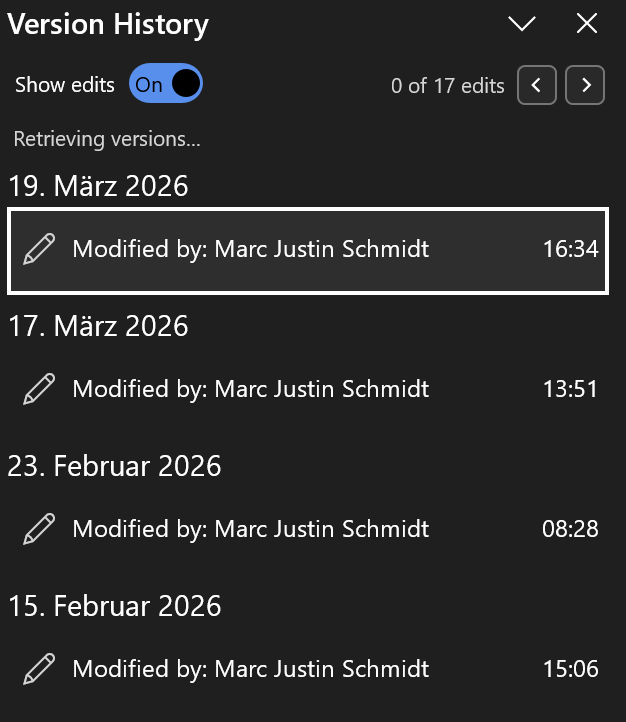
Word logoExcel logo
01

Microsoft Office

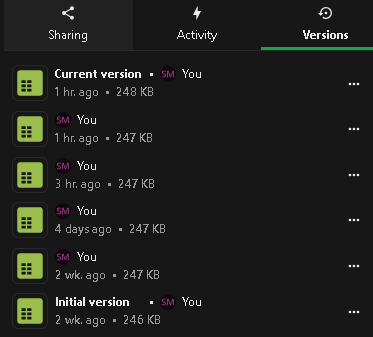
OneDrive logoSciebo logoDropbox logo
02

Cloud storage

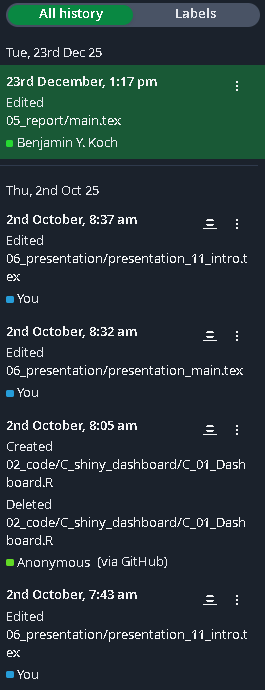
Overleaf logo
03

Overleaf

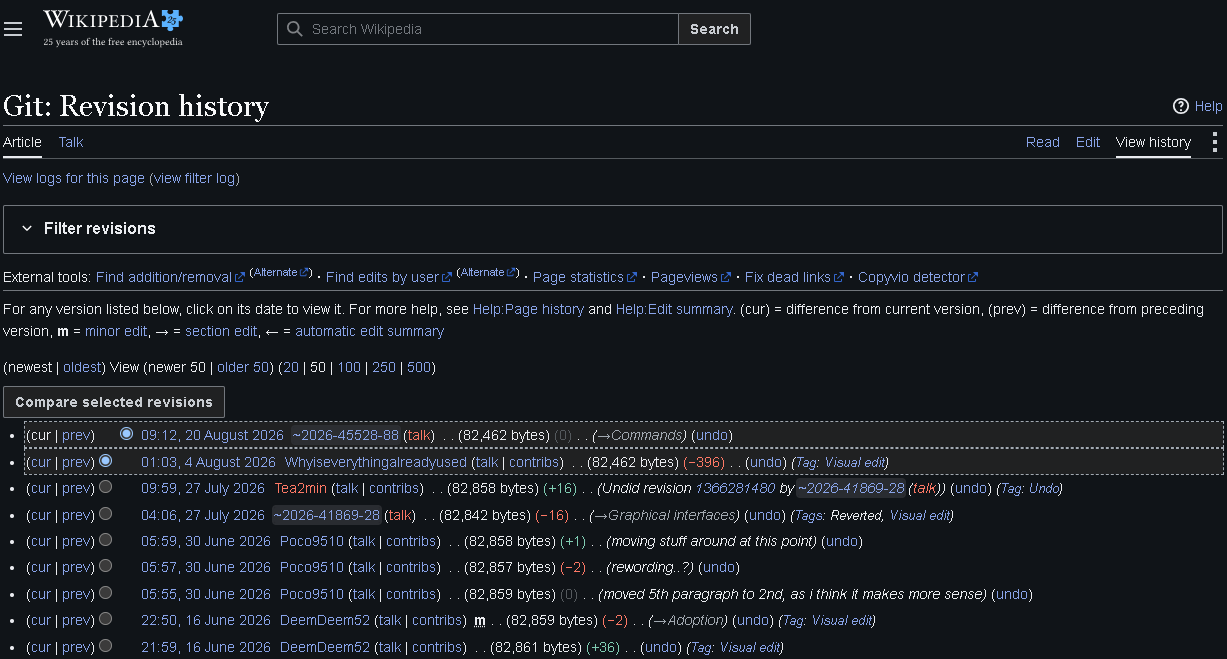
Wikipedia logo
04

Wikipedia

The common principle: earlier states remain identifiable and retrievable without creating another file called final_v2

Dedicated Version Control Tracks a Project Across Many Files

01

History inside one tool

What does it cover?A document, file, or project managed inside one application or cloud service
What is recorded?Earlier states of that document, file, or hosted project
How is a version created?Usually automatically when the application saves or syncs
Where is it saved?Usually in the provider’s cloud service
ExamplesMicrosoft Office, Overleaf, Dropbox
same principle,
more scope + control
02

History for the whole project

What does it cover?Selected files across a research project
What is recorded?Coordinated snapshots of selected project files
How is a version created?Deliberately, by creating a commit (a recorded checkpoint)
Where is it saved?In a repository: locally, on a server, or both
Common softwarePerforce P4 (1995), Subversion (2004), Mercurial (2005), Git (2005)

Details

Git Became the Default Version-Control System

2005
Git was built for a demanding open-source project
LocalFast operations
DistributedFull history per clone
Reported use of common version-control systems
Reported use of Git, Subversion, and Mercurial in Stack Overflow developer surveys from 2015 to 2022 Git was reported by 69.3 percent in 2015, 69.2 percent in 2017, and 93.9 percent in 2022. Subversion declined from 36.9 to 9.1 to 5.2 percent. Mercurial declined from 7.9 to 1.9 to 1.1 percent. 1007550250 201520172022 69.3%69.2%93.9% 36.9%9.1%5.2% 7.9%1.9%1.1% GitSVNMercurial

GitHub Hosts Git, but Git Works Without It

2008
GitHub is a web-based platform around Git
180M+developers
630Mrepositories
Why it leads
  • People are already there
  • Git becomes a work conversation
  • Planning stays (close) beside the work
  • A broad ecosystem
Where else can the repository live?
  • GitLab: cloud-hosted or self-managed
  • Bitbucket: hosting in the Atlassian ecosystem
  • Institutional server: university or company infrastructure
  • Only locally: full history, but no remote backup or online collaboration
How can I operate Git?

Terminal, VS Code, RStudio, GitHub Desktop, other Git clients and IDEs

Details

Sources: (GitHub, n.d., 2025)

Git Is the Engine; GitHub Is the Collaboration Layer

LOCAL: GIT

Git records the project history

  • Tracks working files, selected changes, commits, and branches
  • Keeps the complete history on your computer
  • Works offline and does not require a remote

OPTIONAL REMOTE

Share and receive Git history

REMOTE: GIT REPOSITORY

A provider hosts another copy

  • GitHub, GitLab, Bitbucket, or an institutional server can host it
  • The provider adds access control plus web and app interfaces
  • Collaboration features include pull requests, review, and issues

Git creates the history. A remote exchanges it. A hosting platform organizes collaboration.

Details

Git Workflow

Most work happens locally. The remote is a separate copy for sharing and synchronizing.

Git Is a Documented Shift Handoff

Git & GitHub Setup

Before we work with Git, make sure Git is installed and your GitHub account is connected.

OPEN THE SETUP GUIDE

Learn Terminal First, UI (Potentially) Next

UI = User Interface

Start with terminal commands to understand how Git works

With many commits, an IDE’s Git view may lag. The terminal often stays faster, more flexibel and more useful

Later, use any interface (UI) you find more convenient

GitHub Desktop, VS Code, RStudio, or another Git client. The interface changes; the repository and workflow stay the same

Three Routes Can Create the Same Git Project

B) Existing local folder

  1. Open the project folder
  2. Run git init and make the first local commit
  3. Create a new, empty repository on GitHub
  4. Connect its URL as origin
  5. Push the local commits to GitHub

git init → git remote add origin <url> → git push -u origin main

C) Existing Git repository

  1. Copy its URL from GitHub, GitLab, or another server
  2. Clone the complete history
  3. Inspect remotes and status before editing

git clone <url> → git remote -v

The Structure of a Git Command

git <command> [options] [arguments]

git

program

push

command


no option

origin main

arguments

git

program

commit

command

-m

option

"Summary"

argument

-m

option

"Details"

argument

git help --all

All installed commands

git <command> -h

Short syntax and option list

git help <command>

Complete local manual

git-scm.com/docs

Complete online reference

The Core Git Workflow at a Glance

The habit that prevents most mistakes: inspect the state, preview the change, then act

git status

“What state is my repository in right now?”

git status
  • current branch
  • staged changes
  • unstaged changes
  • untracked files

Safe and read-only, run it often!

On branch main
Your branch is behind 'origin/main' by 1 commit,
and can be fast-forwarded.
  (use "git pull" to update your local branch)

Changes not staged for commit:
  modified:   code/estimate_model.R

Untracked files:
  output/tables/model_notes.txt

Nothing changes until you choose a command

git fetch

“What changed on GitHub, without changing my work?”

git fetch origin

Downloads commits and updates local remote-tracking names such as origin/main

It does not merge into main or modify working files

GitHub main

↓ fetch

local origin/main

your main stays where it is

git pull

“How do I bring remote work into my current branch?”

git status
git pull

Pull only with a clean, understood working tree. Git integrates the configured upstream, such as origin/main

If both sides changed the same lines, Git may pause for a merge conflict

GitHub main

↓ fetch

local origin/main

↓ pull (integrate)

your current branch

git diff

“What exactly changed?”

git diff
git diff --staged

git diff shows unstaged changes

git diff --staged shows the proposed next commit

- keep if employed == 1
+ keep if employed == 1 & age >= 25

- removed    + added

If Git opens the diff in a pager, press q to return to the terminal

git add

“Which change belongs in the next commit?”

git add code/estimate_model.R
git add .

The first command stages one file.

git add . stages all changes below the current directory

Working tree

↓ git add

Staging area

Proposed next commit

Prefer a specific file over git add . until you know every changed file belongs together

git commit

“How do I record the staged snapshot locally?”

git commit -m "Restrict baseline sample to workers aged 25+"

A commit records the staged snapshot, its author, time, and message

Staging area

↓ git commit

Local repository: main

The commit exists locally. Push publishes it

git commit: Good Messages

“How should the message explain the research change?”

git commit -m "Restrict baseline sample to workers aged 25+"

State the research decision in the imperative form. Keep one coherent change per commit

SAMPLE DECISION Restrict baseline sample to workers aged 25+

MODEL SPECIFICATION Add region fixed effects to wage model

REPRODUCIBILITY Document source and construction of AI exposure measure

git push

“How do I publish my local commits?”

git push

Sends commits from the current branch to its configured upstream branch

Push does not create a commit

Local repository: main

↓ git push

Remote repository: origin/main

The commit is now shared remotely

Rejected push? The remote probably moved first. Pull, inspect, integrate, then push again. Do not force it

git log

“What has been recorded, and on which line of work?”

git log --oneline --graph --decorate --all

Read from newest to oldest. Each line identifies a commit; decorations show branch names

* 8c31a9e (HEAD -> main, origin/main)
| Restrict baseline sample to workers aged 25+
* a20d51b Add baseline wage model
* 91e6c44 Create research project structure

git restore

“How do I undo an uncommitted or accidentally staged change?”

git restore --staged code/estimate_model.R

Removes the file from the proposed commit. The working edit remains available

Staging area

↓ git restore --staged

Working tree keeps the edit

CAUTION — CONTENT WILL BE LOST

git restore code/estimate_model.R permanently replaces the uncommitted working edit with the staged version. Preview with git diff first

git revert

“How do I safely undo a commit that may already be shared?”

git revert 8c31a9e

Creates a new commit that reverses the selected commit. Existing history remains intact

Local history at B

↓ git revert B

New commit C reverses B

B remains in the history

git reset: soft, mixed, or hard

“Which parts of the repository should move back?”

DESTRUCTIVE—NOT A NORMAL BEGINNER WORKFLOW

git reset --soft  <commit>  # branch only
git reset --mixed <commit>  # + staging area
git reset --hard  <commit>  # + working tree

--mixed is the default. --hard discards uncommitted tracked changes

mode branch staging area working tree

--soft move branch keep staged keep files

--mixed move branch reset staging keep files

--hard move branch reset staging discard edits

Branches Are Movable Names for Separate Lines of Work

The repository can store many branches. A branch points to a commit; it is not a copied folder

The working tree normally shows one checked-out branch at a time. New commits advance that branch

Here: robustness-check isolates an alternative exposure measure until review

Merge Conflicts: Do Not Panic

A conflict is not corruption. Git stopped and asks for your decision

<<<<<<< HEAD
Notes: Baseline sample excludes workers under 25.
=======
Notes: Baseline sample excludes part-time workers.
>>>>>>> robustness-check

HEAD is the current branch; robustness-check is incoming

1: Inspect
Open the file named by git status

2: Resolve
Write the intended final text and delete all markers

3: Record
Save and test, then run git add and git commit

git switch

“How do I change which branch appears in my working tree?”

git switch -c robustness-check

-c creates the branch and checks it out. Use git switch <branch> to return to an existing branch

git branch

“Which local branches exist, and which one is active?”

git branch

Lists local branches. The asterisk marks the active branch

  main
* robustness-check

git branch -a also shows remote-tracking branches

git push origin robustness-check

“How do I publish a new branch for collaboration?”

git push origin robustness-check
  • origin identifies the remote
  • robustness-check identifies the branch

git merge

“How do I integrate another branch into the current branch?”

git switch main
git merge robustness-check

Merge brings the named branch into the branch currently checked out

Hands-On Exercise

Choose out of three different exercise tasks.

OPEN THE EXERCISE GUIDE

Practical Rules of Thumb

Practical Rules of Thumb

1.Commit small, interpretable changes

2.Never commit confidential raw data

3.Use .gitignore early

4.Pull before pushing when collaborating

5.Write README files for your future self

6.Most useful commands: status, pull, add, commit, push

“Good habits formed at youth make all the difference.” (Aristotle)

The Art of Keeping Your Changes
RGS Econ Workshop

References

Chacon, S., & Straub, B. (2014). Pro git (2nd ed.). Apress. https://git-scm.com/book/en/v2
Cogswell, P. (n.d.). Learn git branching. Retrieved September 15, 2026, from https://learngitbranching.js.org/
Git Project. (n.d.). Git reference documentation. Retrieved September 15, 2026, from https://git-scm.com/docs
GitHub. (n.d.). GitHub docs. Retrieved September 15, 2026, from https://docs.github.com/
GitHub. (2025). GitHub platform history and octoverse 2025. https://github.blog/
Martin and Martin. (n.d.). Advanced research in economics: Git and version control. Retrieved September 15, 2026, from https://are25.netlify.app/git/git_vcs#1
MIT Missing Semester. (2026). Version control with git. https://missing.csail.mit.edu/2026/version-control/
Stack Overflow. (2022). Developer surveys: 2015, 2017, and 2022. https://survey.stackoverflow.co/
The Carpentries. (n.d.). Git novice. Retrieved September 15, 2026, from https://dkz2r.github.io/git-novice/
Werenbeck-Ueding, S. (2026). Data analysis using r: Version control. https://data-analysis-using-r.netlify.app/lecture_htmls/version_control#1

Interactive Git Dictionary

Blob Branch Clone Commit Delta Diff Downstream Fetch Fork .git Hash Local main Merge Merge conflict origin Pull Pull request Push Remote Repository Tree Upstream

Click a term—or focus it and press Enter.

Repository

A project together with Git’s recorded history and metadata. A repository can exist locally, remotely, or in both places

ai-adoption-wage-employment/ + its hidden .git/ directory

.git directory

The hidden directory that turns an ordinary project folder into a local Git repository. It contains Git’s object database, staging index, references, configuration, and HEAD

Do not edit it manually. Normal Git commands read and update this internal database

Local

Stored on your own computer. Editing, staging, committing, branching, and inspecting history can all happen locally without internet access

Remember: local commits are not yet an online backup

Remote

A named connection to another Git repository, usually on a server. origin is the conventional name created by git clone

GitHub is one possible remote host—not Git itself

Clone

Create a local repository from an existing repository, including its project history, and normally configure the source as the remote origin

git clone <url>

Commit

A recorded snapshot of the staged project content, with an author, time, message, and link to earlier history

Commit records locally; push publishes commits to a remote

Hash / object ID

A compact identifier computed from an object’s type and content. Change the content and Git computes a different identifier

Hashes help Git identify exact objects and detect corruption. They are not encryption and do not make sensitive content private

Diff

A comparison that Git calculates between two states, such as the working tree and staging area or two commits

A diff displays changed lines. It is not the stored form of a commit

Delta

A compact representation of one object’s content relative to another. Git may use deltas inside packfiles to reduce storage

Deltas are a storage optimization, not the main mental model for commits

Blob

A Git object that stores file content without the filename or directory path

Trees connect blob IDs to names and locations in a snapshot

Tree

A Git object that records filenames, modes, and links to blobs or other trees. It represents one directory in a snapshot

A commit points to the root tree for the recorded project state

Branch / branching

A movable name pointing to a line of commits. A branch lets work develop separately without copying the whole project folder

Example: robustness-check

main

A common name for a project’s primary branch. It has no special powers in Git, and projects can choose a different name

git switch main switches to your local main branch

origin

The conventional name for the remote that git clone configures. It identifies another repository’s address, and you can rename it

origin/main is your local record of that remote’s main branch, updated when you fetch. After cloning your fork, origin normally points to your fork

Fork / forking

A personal server-side copy of someone else’s repository, usually created on GitHub or GitLab. Forking is a hosting-platform workflow, not a core Git command

Useful when you cannot push directly to the original repository

Upstream

The repository or branch from which changes flow toward you. In a fork workflow, upstream commonly names the original repository

The word is directional: upstream depends on where you stand

Downstream

A repository or user that receives and builds on changes from an upstream source. It is a relationship, not a special type of Git object

Your fork is downstream of the original project

Fetch

Download new commits and remote branch information without integrating them into your current branch or changing your working files

git fetch is the safe “show me what is new” step

Pull

Fetch remote changes and then integrate them into the current branch. In the beginner workflow this normally means fetch followed by merge

Pull changes local state; inspect first when collaboration is active

Push

Send local commits to a remote repository and update its corresponding branch—if the remote accepts the update

Push does not create the commit; it transfers commits already made

Merge

Combine two development histories. Git may move the branch forward directly or create a merge commit; overlapping edits can require a conflict decision

Merge integrates histories—it does not mean “upload”

Merge conflict

A situation in which Git cannot automatically combine overlapping changes and pauses so a person can decide the correct final content

Conflict markers—<<<<<<<, =======, and >>>>>>>—identify the competing sections. Resolve the content, remove the markers, then stage and commit the result

Pull request

A hosting-platform proposal to review, discuss, and merge changes from one branch into another. It is not the same operation as git pull

Example: propose robustness-check → main for co-author review

Version Control Protects More Than Code

02

Good Scientific Practice

Support transparent, traceable, and reproducible research workflows

03

Reproduce results

Return to the exact project state used to produce a reported result

04

Explain provenance

Connect a figure or estimate to its code, data state, and assumptions

05

Record decisions

Preserve why a sample, model, or interpretation changed

06

Attribute contributions

Make authorship and responsibility visible across the project history

07

Recover mistakes

Return to a known working state without guessing which backup is correct

08

Compare ideas

Test specifications in parallel without overwriting the baseline analysis

09

Review changes

Inspect and discuss changes before accepting them into shared work

10

Coordinate work

Let collaborators contribute asynchronously without passing folders around

11

Release and continue

Mark submissions clearly and help future collaborators understand the project

Back

System Architectures

Local only

One machine stores the revisions. Simple, but difficult to share

Standard example: RCS

Familiar examplesEditor undo, Windows File History, Time Machine

Client–server (centralized)

One authoritative server coordinates every collaborator

Standard examples: CVS, Subversion, Perforce

Familiar examplesWord / Google Docs history, OneDrive / Sciebo / Dropbox, Overleaf, Wikipedia

Distributed (decentralized)

Every clone contains the project history and can work locally

Standard examples: Git, Mercurial, Darcs

Familiar examplesGitHub / GitLab clones, Linux kernel, open-source projects

Back

Git Stores Snapshots as Objects—not as Saved Diffs

LOGICAL MODEL · SNAPSHOTS

1 · Working file

code/estimate_model.R

An ordinary saved file on disk

→ git add

2 · Index

.git/index

Paths, modes, and object IDs selected for the next snapshot

→ git commit

3 · Object graph

commit → tree → blob

The commit also points to its parent commit(s)

INSIDE .git/

.git/
├── objects/       blobs, trees, commits
│   └── pack/      packed objects + index
├── index          proposed next snapshot
├── refs/heads/    branch pointers
└── HEAD           current branch

Blob: file content, without its filename
Tree: names + modes + blob/subtree IDs
Commit: root tree + parent(s) + metadata

A diff is a comparison—not the commit

git diff compares the working tree, index, or two snapshots and calculates the displayed changes when requested

Physical storage is optimized

Loose objects are compressed. Packfiles combine many objects and may store similar content as deltas to save space

Back

Inside Git and a Hosting Platform

GIT: LOCAL ENGINE

A content-addressed project database

  • Objects: file content (blobs), folder snapshots (trees), commits, and tags
  • Hash IDs: content determines an object’s identifier; changed content produces a different ID
  • References: branches and tags are readable names pointing to objects
  • Local state: .git/index, .git/objects, .git/refs, and HEAD

8f2c1a7… → one exact object

push →
← fetch

Git protocols transfer missing objects and update references

HOSTING PLATFORM: REMOTE

A hosted interface around repositories

  • Stores remote Git repositories and controls access
  • Renders files, commits, branches, and differences in a browser
  • Adds pull requests, issues, review, discussions, and notifications
  • Connects people and public or private projects

Not included automatically: data governance, permission to share, or protection from committing secrets

Back

Six GitHub Topics for Further Study

The core workflow is only the starting point. Each block below can support a separate advanced session

REPOSITORY SETUP

  • Which visibility and permission model works across institutions with different data rules?
  • How should licensing differ for code, documentation, and data that cannot be redistributed?
  • When should a team standardize HTTPS, SSH, commit signing, or organization-managed access?

COLLABORATION

  • How should a team choose between shared branches, forks, and several dependent pull requests?
  • Which review rules preserve quality without blocking a small research team?
  • How should draft pull requests, code ownership, and handoffs work across institutions?

PROJECT MANAGEMENT

  • How can issues represent dependencies between data access, estimation, and writing?
  • Which custom fields and automations reveal bottlenecks without creating administrative work?
  • When should one Project span several repositories, milestones, and paper releases?

REVIEW & GOVERNANCE

  • Which rulesets and automated checks should apply to main and release branches?
  • How should least-privilege access work for co-authors and external collaborators?
  • Which merge policy creates an auditable history without making maintenance cumbersome?

RESEARCH HYGIENE

  • How can confidential inputs remain outside Git while derived results stay reproducible?
  • Which artifacts belong in Git, a release, an archive, or external research storage?
  • How should releases, persistent identifiers, environments, and data-access statements connect?

PRACTICAL DEMONSTRATION

  • How can a review verify code, generated outputs, and empirical claims together?
  • Which automated checks could test the pipeline without exposing restricted data?
  • Which continuity plan covers outages, lost devices, revoked access, and departing collaborators?

Back

Source: (GitHub, n.d.)

Issues Turn Research Work Into Trackable Tasks

One issue = one clearly described unit of work

1 · QUESTION

Add a regional robustness check

→

2 · ISSUE #12

Scope, acceptance check, context

→

3 · ORGANIZE

Assignee, label, milestone

→

4 · LINK PR

robustness-check addresses #12

→

5 · CLOSE

The reviewed change completes the task

Back

Source: (GitHub, n.d.)

Projects Show the Same Work From Different Angles

Issues and pull requests remain the work items; a Project supplies structure and views

TABLE

Item Status Priority
#12 Robustness In progress High
#15 README Ready Medium

Best for a compact research backlog

BOARD

Ready

#15 README

In progress

#12 Robustness

Done

#08 Clean data

Best for workflow and handoffs

ROADMAP

Data
██████
Model
 ██████
Paper
   ████

Best for timing and milestones

Back

Source: (GitHub, n.d.)

GitHub Adds Coordination Around the Repository

GIT REPOSITORY

Files, commits, branches, tags

PULL REQUESTS

Review and discuss proposed changes

DISCUSSIONS

Open-ended questions and decisions

RELEASES

Publish a tagged research snapshot

ACTIONS

Automate checks and repeatable tasks

ACCESS & SECURITY

Roles, branch protection, and alerts

BROWSER & HISTORY

Inspect files, commits, blame, and diffs

Back

Source: (GitHub, n.d.)